<!DOCTYPE html PUBLIC "-//WAPFORUM//DTD XHTML Mobile 1.2//EN" "http://www.wapforum.org/DTD/xhtml-mobile12.dtd">
<html xmlns="http://www.w3.org/1999/xhtml" xml:lang="ko">
<head>
	<meta http-equiv="Content-Type" content="text/html; charset=utf-8" />
	<title>한사평모바일</title>
	
		<meta name="viewport" content="width=device-width,user-scalable=0, initial-scale=1, maximum-scale=1, minimum-scale=1" />
	
    <link rel="apple-touch-icon" href="/images/hsp_icon.png"/>
	<link rel="stylesheet" type="text/css" href="/common/css/common.css" />
	<link rel="stylesheet" type="text/css" href="/common/css/ui.css" />
    <script type="text/javascript" src="/common/js/jquery-1.4.2.min.js"></script>
    <script type="text/javascript">
        $(window).load(function () {
            $("img").each(function () {
                var imgWidth = $(this).width();
                var maxWidth = $("#container").width()-20;
                if (imgWidth > maxWidth) {
                    $(this).width(maxWidth);
                    $(this).height($(this).height() * Number(maxWidth / (maxWidth-imgWidth)));
                }
            });
        });
    </script>
    <!--  CPCGUARD SCRIPT V5.0 -->
    <script type="text/javascript">
        var cpc_protocol = document.location.protocol || "http:";
        var cpc_script_host = ["//nsc1.cpcguard.com", "//vsc1.cpcguard.com"];
        var cpc_script_image = cpc_protocol + cpc_script_host[0] + "/cpcguard.gif?cache=" + (new Date()).getTime();

        function cpcguard_script_bind(i) {
            try {
                var _head = document.getElementsByTagName("head")[0] || document.documentElement;
                if (_head) {
                    var _script = document.createElement("script"); _script.id = "include_cpc_script"; _script.type = "text/javascript"; _script.charset = "utf-8"; _script.async = true; _script.src = (cpc_protocol + cpc_script_host[i] + "/new/cpc_script.js");
                    _head.appendChild(_script);
                } else { window.setTimeout(arguments.callee(i), 500); }
            } catch (e) { }
        }
        if (!document.getElementById("include_cpc_script")) { document.write("<img src='" + cpc_script_image + "' style='width:1px;height:1px;position:absolute;' onload='cpcguard_script_bind(0)' onerror='cpcguard_script_bind(1)' />"); }
    </script>
    <!-- CPCGUARD SCRIPT END -->

<link rel="stylesheet" type="text/css" href="/css/bbs.css" />
</head>

<body>
	<div id="container">
		
		<div id="contents">
			 <div class="sbbar">
			 <strong>교육비납입증명신청(소득공제용) 안내</strong> <br />
			 <span>2017.01.16<span style="padding:0 6px 0 6px;">l</span>7088</span>
		  </div>
				<div class="ctsarea">
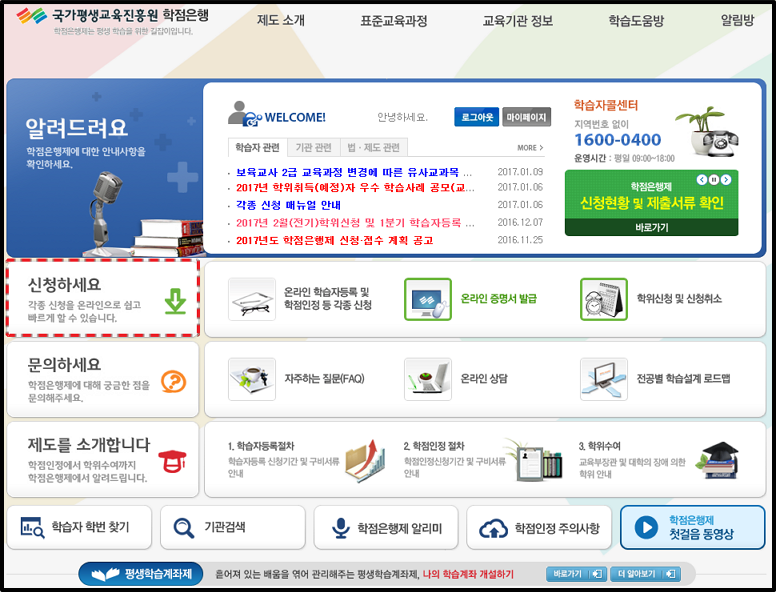
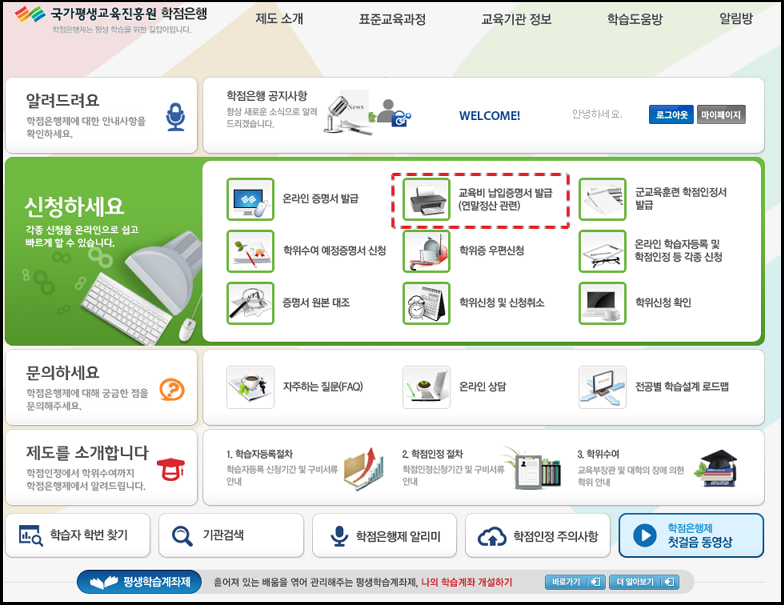
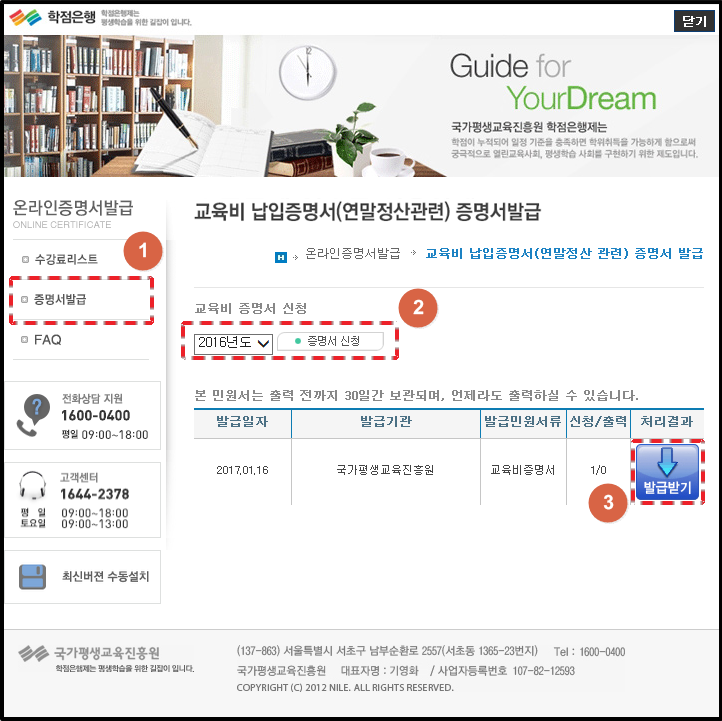
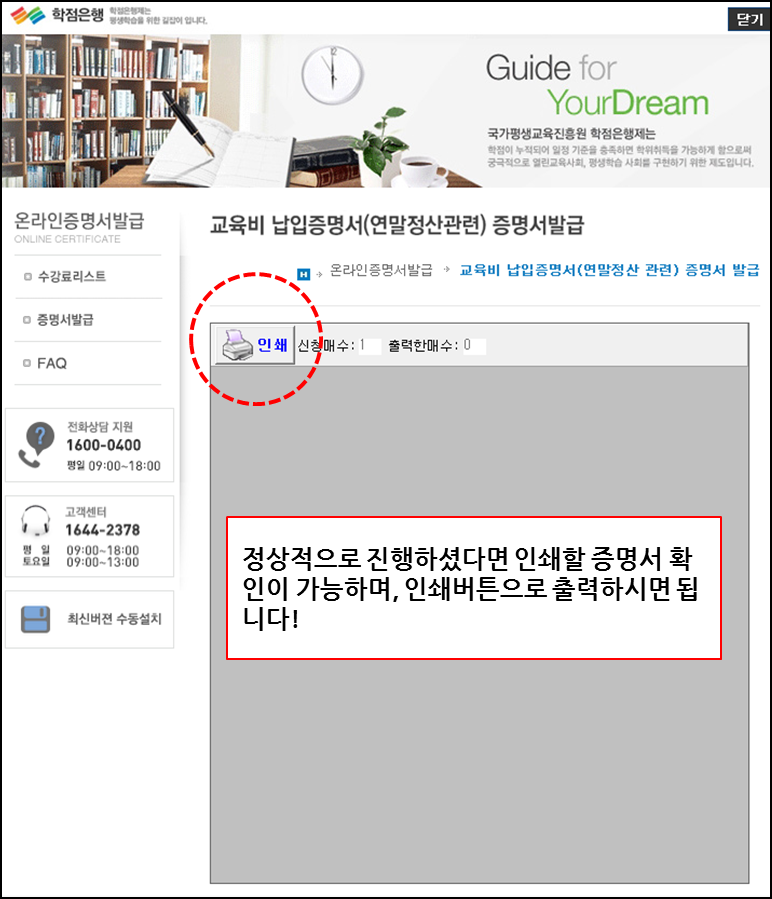
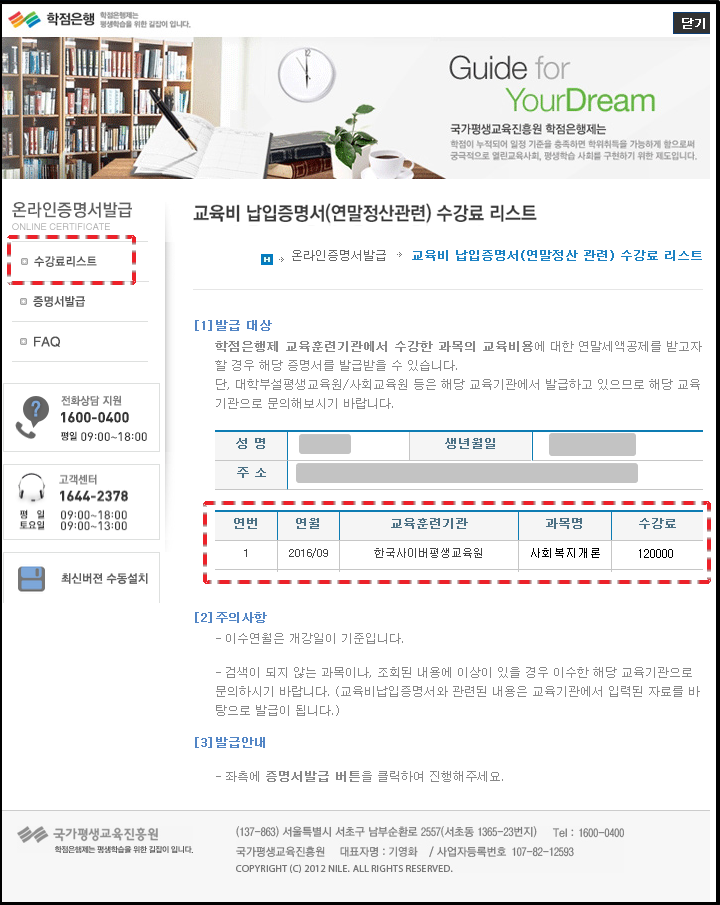
                   <P>안녕하세요~ 한국사이버평생교육원입니다.<BR><BR>수강신청하신 수강료에 대한 <STRONG><FONT color=#ff0000>교육비 납입증명서 (소득공제용) 발급방법에 대해 안내</FONT></STRONG>해드리겠습니다.<BR><BR>아래 방법처럼 진행하시기 바랍니다.<BR>* 해당 증명서는 국가평생교육진흥원 학점은행센터 홈페이지에서 직접 발급 받으셔야하며, 발급 관련 문의는 국가평생교육진흥원(Tel.1600-0400)으로 문의하시기 바랍니다.<BR><BR>연말정산용 교육비 납입증명서는 해당기관 수업의 개강일 기준으로 발급이 가능하며, 홈페이지 초기화면 <STRONG><FONT color=#0000cc>[신청하세요&gt; 교육비 납입증명서 발급]</FONT></STRONG> 메뉴에서 발급 가능합니다.<BR><BR>* 현재 <STRONG><FONT color=#006633>2017년 1월 개강강좌까지 교육비 납입증명서 발급이 가능</FONT></STRONG>합니다. <U>2017년 1월 개강강좌의 경우 내년 연말정산에 포함되는 부분이니,</U> 참고하여 주시기 바랍니다.<BR><BR><STRONG>&lt;교육비 납입증명서 발급 방법&gt;<BR></STRONG><BR><STRONG>1) 국가평생교육진흥원 홈페이지(</STRONG><A href="http://www.cb.or.kr/"><STRONG>http://www.cb.or.kr</STRONG></A><STRONG>) 접속 및 [신청하세요] 클릭.<BR></STRONG><IMG style="HEIGHT: 516px; WIDTH: 630px" border=0 hspace=0 alt="" src="http://www.hakjum.com/pds/notice/IMG1.png" width=777 align=baseline height=590><BR><BR><BR><STRONG>2) [교육비 납입증명서 발급] 클릭.<BR><BR></STRONG><IMG style="HEIGHT: 464px; WIDTH: 632px" border=0 hspace=0 alt="" src="http://www.hakjum.com/pds/notice/IMG2.png" width=783 align=baseline height=605><BR><BR><BR><BR><STRONG>3) 교육비 납입증명서 수강료 리스트 창이 확인됩니다. 증명서 발급을 원하시는 학습자분들은 <FONT color=#0000ff>[증명서 발급]을 클릭</FONT>해주세요. </STRONG>(로그인이 필요한 페이지며, 국가평생교육진흥원에 회원가입이 안되어 있다면 회원가입을 먼저 진행해 주세요!)<BR><BR><IMG style="HEIGHT: 832px; WIDTH: 637px" border=0 hspace=0 alt="" src="http://www.hakjum.com/pds/notice/IMG3.png" width=719 align=baseline height=905><BR><BR><STRONG><BR>4) [증명서발급] 메뉴에서 발급하고자 하는 연도 확인 후, <FONT color=#0000ff>[증명서 신청]을 클릭</FONT>해주세요. 신청 후 에는 하단에 "발급받기" 메뉴가 생성됩니다.<BR></STRONG><BR><IMG style="HEIGHT: 652px; WIDTH: 639px" border=0 hspace=0 alt="" src="http://www.hakjum.com/pds/notice/IMG4.png" width=722 align=baseline height=722><BR><BR><BR><STRONG>5. 증명서 조회 및 출력</STRONG><BR><BR><IMG style="HEIGHT: 759px; WIDTH: 641px" border=0 hspace=0 alt="" src="http://www.hakjum.com/pds/notice/IMG5.png" width=770 align=baseline height=899><BR><BR><BR><STRONG>- 출력 및 소득공제 관련 자세한 문의는 <FONT color=#ff0000><U>국가평생교육진흥원(1600-0400)으로 문의</U></FONT>하시기 바랍니다!</STRONG></P>
				</div>
				<div class="btnbox">
					<a href="javascript:history.back();"><img src="../images/btn_historyback.jpg" alt="이전으로" /></a>
				</div> 
		</div>
        
		<div id="footer">
			Copyright (c) <span style="color:#0d2785; font-weight:bold;">Goodlearning</span>. All rights reserved
		</div>
		<!--
		<p style="background:#08f;width:320px">320px</p>
		<p style="background:#0f3;width:300px">300px</p>
		<p style="background:#f03;width:200px">200px</p>-->
	</div>
</body>
</html>